
Overview
The Mission Hub is the central workspace of SatModeler and represents the top-level mission definition environment.
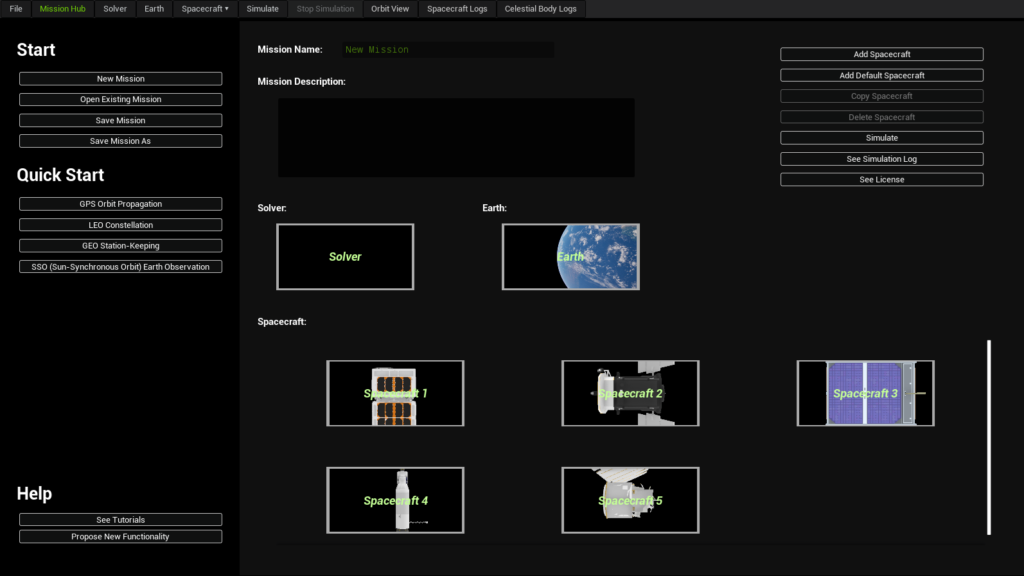
It is the first workspace presented to the user upon entering the application and serves as the primary coordination layer for all mission components. Within the Mission Hub, users define and manage the global structure of a mission before any simulation is executed.
The Mission Hub does not perform numerical propagation itself. However, all simulations executed in SatModeler originate from the configuration defined in the Mission Hub.
Main Features
Block-based mission architecture
The Mission Hub is organized around a block-based system, where each block represents a major element of the simulation environment:
- Solver
- Earth
- Spacecraft (one or multiple)
Each block encapsulates its own configuration workspace while remaining part of a single mission context. This structure allows complex missions to be assembled, modified, and extended in a clear and modular way.
Blocks displayed in the Mission Hub are interactive. Double-clicking on a block opens its corresponding configuration workspace (Solver, Earth, or Spacecraft), enabling fast navigation between high-level mission definition and detailed subsystem configuration without leaving the mission context.
Default spacecraft creation
When selecting Add Default Spacecraft, SatModeler creates a new spacecraft block with a basic predefined configuration, including:
- Default position and velocity
- Default mass and inertia properties
- Default perturbation configuration.
This feature is intended for:
- Rapid prototyping
- Test simulations
- Demonstrations and exploratory analyses
It allows users to run simulations without having to manually configure all spacecraft parameters from scratch.
Multi-spacecraft support
The Mission Hub supports missions containing multiple spacecraft simultaneously.
Each spacecraft is represented as an independent block, allowing:
- Constellation simulations
- Formation flying analyses
- Comparative studies between spacecraft configurations
All spacecraft blocks share the same Solver and Earth configuration unless explicitly modified.
How to Use
- Create a new mission or open an existing mission from the Mission Hub.
- Define the mission name and optional description.
- Configure the Solver and Earth blocks as required for the mission.
- Add spacecraft using:
- Add Spacecraft for fully custom configurations, or
- Add Default Spacecraft for rapid setup using predefined parameters.
- Access any block by double-clicking it to open its detailed configuration workspace.
- Save the mission.
- Saving is required before simulation execution is enabled.
- Once the mission structure is defined and saved, start the simulation using Simulate.
After execution, simulation results can be inspected through Orbit View and the corresponding log panels.